The Ultimate Streaming Control Center

One app to rule them all. Multistream to every platform at once, control OBS, manage Twitch channel points, integrate smart home devices, and engage your chat — all from a single, beautiful interface.

Also available for macOS

macOS Native App
OBS 28+ WebSocket 5
30 Days Free Trial
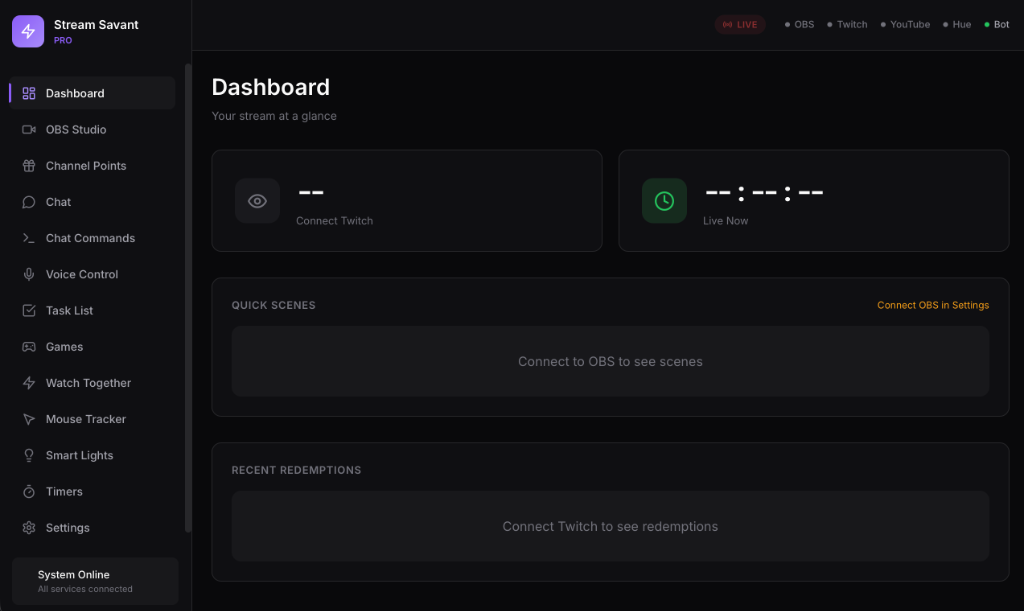
Stream Savant Dashboard

Seamlessly integrates with

OBS Studio
Twitch
YouTube
Philips Hue
Text-to-Speech
See It In Action

Four minutes, every feature

A full walkthrough — multistreaming, the vertical layout editor, chat, channel points, and more.

Features

Everything you need to level up your stream

Built by streamers, for streamers. Every feature designed to make your life easier.

Multistream + Vertical

Go live on Twitch, YouTube, Kick, Facebook and TikTok at the same time — including a vertical 9:16 feed with its own layout and live chat overlay. No plugins, no restream service.

Smart Raid

Intelligent raid suggestions based on who's live, mutual community, and viewer overlap. Never scramble for a raid target again.

Whisper Dictation

Built-in OpenAI Whisper for instant voice-to-text. Dictate chat responses, commands, or notes without typing.

TTS Rewards

Let viewers speak on stream with channel points! AI-powered text-to-speech with customizable voices and profanity filters.

Stream Recommendations

AI-powered suggestions for tags, categories, audio levels, and raid targets. Optimize your stream before you go live.

Watch Together

Watch videos and play music with your chat in sync. Perfect for watch parties, reactions, and community moments.

Mouse Tracker

Visual mouse position overlay for OBS. Show viewers exactly where you're clicking in tutorials and gameplay.

Live Subtitles

Real-time captions powered by Whisper. Make your stream accessible and reach a wider audience automatically.

Smart Home

Control Philips Hue lights with channel points. Let chat change your room lighting for epic reactions and alerts!

Plus all the essentials:

✓ OBS WebSocket 5 Control ✓ Channel Points Integration ✓ Unified Twitch + YouTube Chat ✓ Stream Games & Chat Games ✓ Custom Chat Commands ✓ Scene Switching ✓ Recording Controls ✓ Chat Overlays for OBS

Ready to transform your stream?

Try StreamSavant with your own setup. Your first 30 days are free, with no card required.

✓ 30-day free trial    ✓ No card required    ✓ macOS & Windows

Pricing

Simple, flexible pricing.

Try every feature free for 30 days. Choose a plan when you're ready.

Download for Windows

30 days free. No card or automatic billing.

Download for macOS

Early-adopter pricing

Monthly

$5 USD / month

Your rate is guaranteed for your first 12 months.

Billed today, then monthly. Cancel anytime.

Included with both plans

  • Multistream with standard and vertical layouts
  • OBS controls and unified chat
  • Studio themes, overlays and automations
  • All app features on Windows and macOS

Already have a license? Your existing purchase remains valid. Manage your subscription or contact support.

FAQ

Frequently asked questions

How does the 30-day free trial work?

Download and open the app to start your trial. No card or checkout is needed, and you won't be charged automatically. After 30 days, choose $5/month or $99 Founder Lifetime to keep using it.

Do I need hardware?

Nope! StreamSavant is a software-only solution. No expensive Stream Deck hardware required.

Which platforms are supported?

Both macOS and Windows. StreamSavant runs natively on Apple Silicon Macs and on Windows 10/11 (64-bit). The download button auto-detects your platform.

Can I cancel anytime?

Absolutely. No contracts, no hidden fees. Cancel your subscription whenever you want.

How long is the $5 price guaranteed?

Your $5 monthly rate is guaranteed for your first 12 months after subscribing. You pay month to month and can cancel whenever you like.

What does Founder Lifetime include?

Pay $99 once for all app features and future updates. There are no recurring charges. The free trial is a separate download; a lifetime purchase is charged when you check out.

What happens to my existing license?

Existing monthly, annual and Founder Lifetime purchases keep their original terms. You can keep using your license key and manage an existing subscription through the billing portal.

What OBS version do I need?

StreamSavant requires OBS Studio 28 or later with WebSocket 5 support (included by default in OBS 28+).

Roadmap

What's coming next

We're building StreamSavant in public. Here's what's on the horizon.

✓ Shipped

macOS Launch

Full-featured macOS app with OBS integration, channel points, TTS, and smart home control.

✓ Shipped

Windows Support

Native, signed Windows application with full feature parity and automatic updates.

✓ Shipped

Multistream & Vertical Streaming

Stream to Twitch, YouTube, Kick, Facebook and TikTok simultaneously — with a composited vertical feed and live chat overlay.

🔧 Up Next

PNGtuber Avatars

Turn any image into a reactive avatar — it talks when you talk and bounces with your voice, added to OBS in one click. No extra apps, no rigging.

📋 Planned

Face-Tracked Avatars

Webcam face tracking mapped onto your 2D character — eyes, mouth, and head movement, running right in your browser source. VTuber energy without the VTuber setup.

📋 Planned

AI Chat Moderation

Smart moderation that learns your preferences and automatically handles spam and toxicity.

📋 Planned

Mobile Companion App

Control your stream from your phone. Perfect for IRL streaming and quick adjustments.

Updates

Stay in the loop

Join our community to get the latest news, updates, and early access to new features.

💬

Join Our Discord

Get help, share feedback, and connect with other streamers using StreamSavant.

Join Discord
Release Notes

Latest updates

v1.2 July 2026 Latest

🛠️ The Beta Feedback Update

Nearly everything in this release came directly from beta tester reports — thank you, and keep them coming in the Discord.

  • Chat bubble popups: text size, bubble width, spacing, opacity, count and duration controls
  • Chat command permissions: everyone, subscribers, mods, or broadcaster only
  • OBS chat overlay: message lifetime setting, and Clear Chat now clears the overlay too
  • One-click ffmpeg install/update for multistreaming (no restart needed)
  • YouTube Vertical multistream destination for separate Shorts-style streams
  • Spotify connection fixed (new Spotify redirect requirements)
  • OBS connection now auto-reconnects after sleep/wake or an OBS restart
  • Vertical layouts always preserve aspect ratio — no more stretching
  • Replay buffer respects its auto-start setting
v1.1 July 2026

📡 The Multistream Update

  • Multistream to Twitch, YouTube, Kick, Facebook, TikTok, or any custom RTMP — no plugins or restream service needed
  • Vertical 9:16 output with a visual layout editor: crop regions from your scene and stack them portrait, with a live chat overlay baked in
  • One-click "Add to OBS" buttons place any overlay into your OBS scenes automatically
  • UI scale setting for large and high-DPI displays
  • Smarter live subtitles: hallucination filtering and steadier captions
  • Go Live now auto-fixes OBS stream settings pointed at the wrong service
v1.0.3 June 2026

🪟 Windows Launch

  • Native Windows app with full feature parity
  • Code-signed installers on both platforms
  • Automatic in-app updates
v1.0.0 January 2026

🚀 Initial Release

  • OBS WebSocket 5 integration with scene switching and source control
  • Twitch channel points redemption system
  • Unified chat view for Twitch and YouTube
  • Text-to-Speech with multiple voices and profanity filter
  • Philips Hue smart home integration
  • Word Rush chat game with OBS overlay
  • Native macOS app with system integration